The SABRENT SuperSpeed 2 Slot USB 3.0 Flash Memory Card Reader review centers on a straightforward adapter for transferring files from several common memory card formats.
Its USB 3.0 connection, broad stated card support, and plug-and-play design make it a practical fit for basic photo and file access.
SABRENT Card Reader Review Summary
The quick verdict
10,000+ ratings
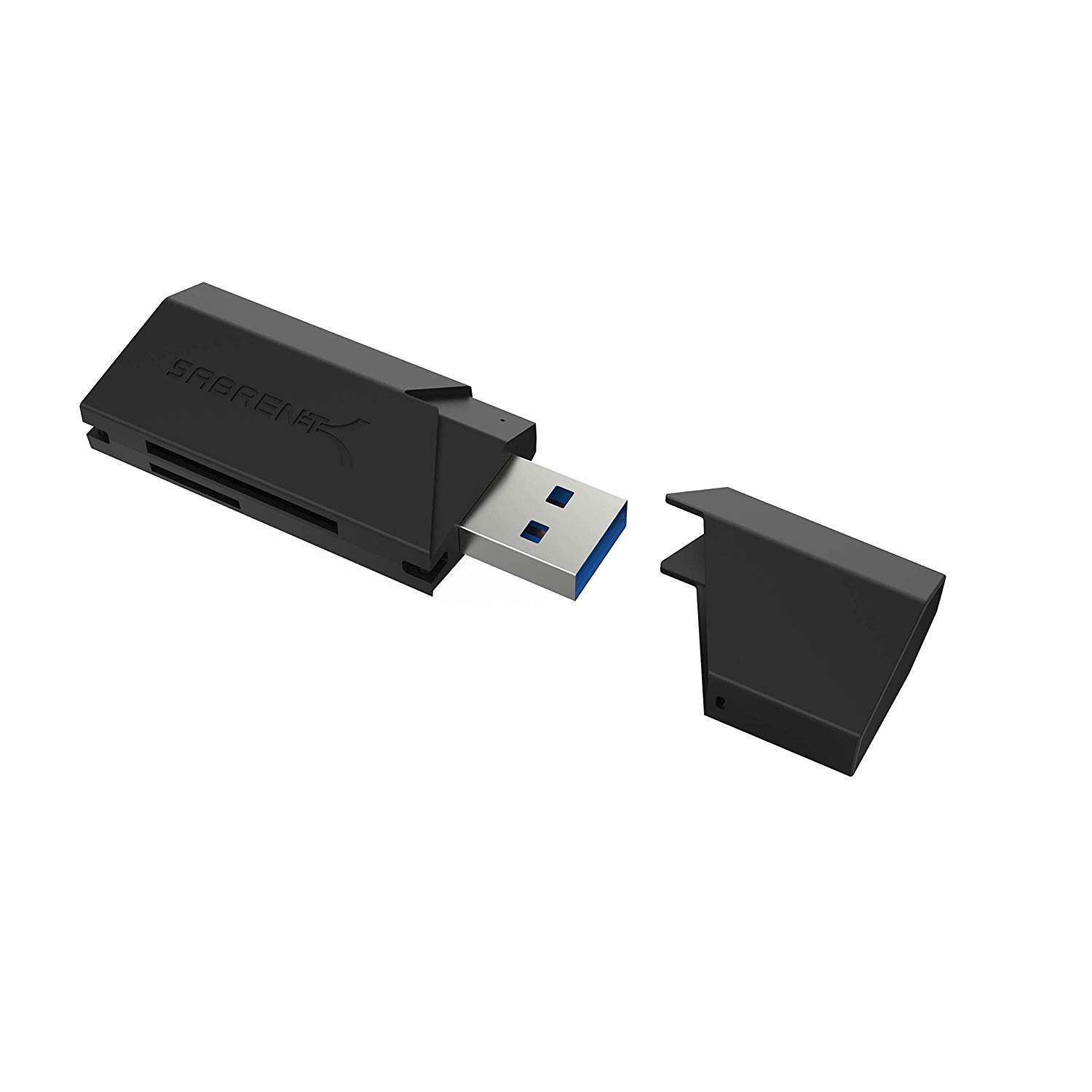
Read Amazon ReviewsSABRENT CR-UMSS Card Reader
A simple USB 3.0 reader for people moving files from SD or microSD cards to computers with a compatible USB port.
- USB 3.0 interface for connection to a compatible host.
- Backward compatible with USB 2.0 hosts.
- Supports SD, SDHC, SDXC, MMC, microSD, and T-Flash cards.
- Powered through the USB port, with no additional power supply required.

Pros
- Covers multiple commonly used memory card formats.
- Does not require a separate power adapter.
Consider before buying
- The connection is described as USB 3.0, so buyers with USB-C-only devices should check whether they have a compatible port or adapter.
- No transfer-rate guarantee is provided; USB 3.0 describes the interface, while results depend on the card and host.
Read the full review summary
The CR-UMSS is designed to make memory cards accessible through a computer’s USB port, without a separate power supply or installation process.
It supports SD, SDHC, SDXC, MMC, microSD, and T-Flash, so it can serve households or workspaces that handle a mix of cards.
Its main appeal is simplicity: connect the reader to a compatible USB port, insert a supported card, and access its files.
It suits users who want a compact, single-purpose reader for occasional transfers; before buying, check that your computer has the USB connection you need and that your card type is among those listed.
The buying factors
SABRENT Card Reader Scorecard
Editorial scores reflect listed features and buyer fit; they are not laboratory measurements or customer ratings.
Card-format coverage
Supports several SD-family formats as well as MMC, microSD, and T-Flash.
Connection flexibility
USB 3.0 is backward compatible with USB 2.0 hosts, though the description identifies no USB-C connection.
Setup simplicity
Plug-and-play operation requires no installation.
Power convenience
The reader draws power through USB, so it needs no separate power supply.
Portability
A USB-powered reader is convenient to carry with a computer, though the description gives no dimensions or storage features.
Transfer potential
USB 3.0 offers a higher-bandwidth interface than USB 2.0, but actual transfer rates depend on the card, host, and files.
Key Features and Specifications of SABRENT Card Reader
- USB 3.0 interface for connection to a compatible host.
- Backward compatible with USB 2.0 hosts.
- Supports SD, SDHC, SDXC, MMC, microSD, and T-Flash cards.
- Powered through the USB port, with no additional power supply required.
- Plug-and-play operation with no installation required.
- The product title lists Windows, Mac, Linux, and certain Android systems.
Pros and Cons of SABRENT Card Reader
Pros
- Covers multiple commonly used memory card formats.
- Does not require a separate power adapter.
- Plug-and-play setup keeps file access straightforward.
- USB 2.0 backward compatibility can help with older hosts.
Consider before buying
- The connection is described as USB 3.0, so buyers with USB-C-only devices should check whether they have a compatible port or adapter.
- No transfer-rate guarantee is provided; USB 3.0 describes the interface, while results depend on the card and host.
- The listed Android compatibility applies only to certain systems, so confirm compatibility with your specific device before relying on it.
Who Should Buy SABRENT Card Reader?
Good fit
Consider the CR-UMSS if you regularly need to read SD-family, MMC, microSD, or T-Flash cards on a computer and want a simple USB-powered accessory.
It is particularly suited to a desk setup or a basic transfer kit where plug-and-play operation matters more than advanced card-management features.
It can also make sense as a spare reader for moving photos and documents between compatible cards and a computer.
Check the card format and host port you plan to use before choosing it, especially if you expect to connect it to an Android device.
Who should skip it
Look elsewhere if your device has only USB-C ports and you do not want to use an adapter.
Also consider another option if you need a confirmed transfer-rate target or dependable compatibility with a particular Android model, since those details are not established here.
How the SABRENT Card Reader fits everyday file transfers
Card support for mixed devices
Support for SD, SDHC, SDXC, MMC, microSD, and T-Flash gives the reader a useful range for basic transfers.
That matters when cards come from different cameras or devices, though buyers should match the exact format they use to the supported list.
USB 3.0 and real-world transfers
The USB 3.0 interface provides a modern connection for compatible hosts and remains compatible with USB 2.0.
It may help avoid an older interface becoming the main bottleneck, but it cannot guarantee a particular speed: the memory card, computer, and files being moved all affect transfer time.
A simple, self-powered setup
Plug-and-play operation and power from the USB port keep setup uncomplicated.
There is no separate power supply to carry, which is convenient for occasional transfers; users should still confirm that the computer or device they plan to use can connect to the reader.
Compatibility across operating systems
The product title names Windows, Mac, Linux, and certain Android systems. That range suggests several possible uses, but Android support is qualified, so checking the specific phone or tablet and its available connection is sensible before purchase.
Alternatives to SABRENT Card Reader
One useful alternative is included to cover a reader with both USB-C and USB-A connections.
Computer Memory Card Readers alternative
2,000+ ratings
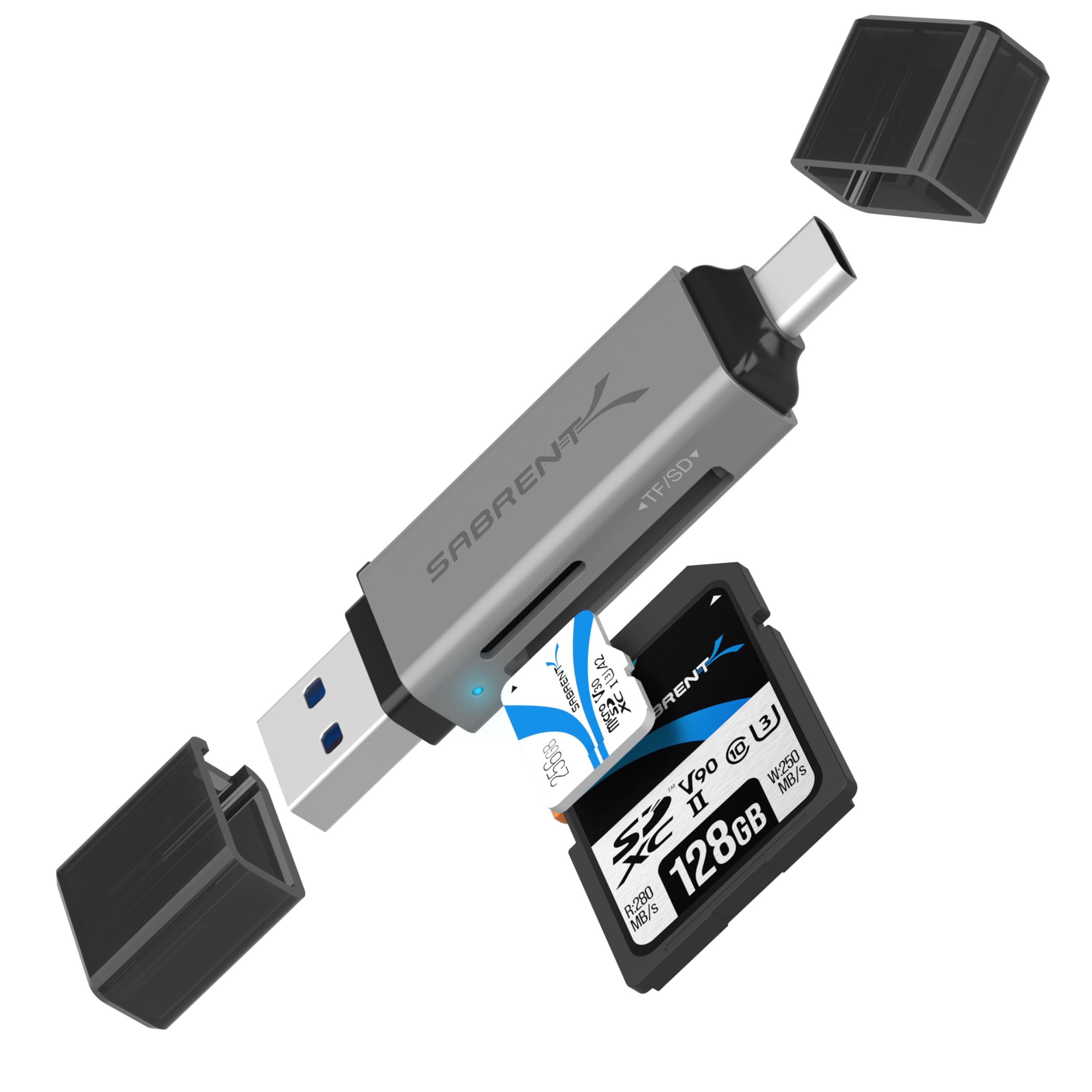
Read Amazon ReviewsSABRENT CR-BCA2 USB-C and USB-A Card Reader
Choose the CR-BCA2 if you need both USB-C and USB-A connections or want an activity indicator. The CR-UMSS remains a suitable choice when its USB connection and broader listed format support match your setup.
- The CR-BCA2 includes USB-C and USB-A connections, supports SD and microSD card families, and has a built-in LED activity indicator.
- Its stated USB 3.0 interface supports speeds up to 5Gbps.
- The CR-UMSS uses a USB 3.0 connection and supports SD, SDHC, SDXC, MMC, microSD, and T-Flash.
Is SABRENT Card Reader Worth It?
The SABRENT CR-UMSS is worth considering as a straightforward reader for common memory cards. Its broad listed format support, USB-powered operation, and plug-and-play setup suit routine file transfers without much setup.
Before buying, make sure its USB connection works with your device and that your card format is supported. If you need USB-C connectivity or a specifically confirmed transfer rate, compare those requirements carefully before choosing.
Your review at a glance
10,000+ ratings
Read Amazon ReviewsSABRENT CR-UMSS Card Reader
A simple USB 3.0 reader for people moving files from SD or microSD cards to computers with a compatible USB port.
- USB 3.0 interface for connection to a compatible host.
- Backward compatible with USB 2.0 hosts.
- Supports SD, SDHC, SDXC, MMC, microSD, and T-Flash cards.
- Powered through the USB port, with no additional power supply required.